Paid Ads & Performance

Google Ads Management

Day-to-day Google Ads ownership: structure, bids, creative, negatives and conversion tracking, reported honestly.

Current offer
Paid search

Google Ads Lead Plan

Turn Google searches into enquiries

₹4,999*/month management
  • Account and competitor audit
  • Campaigns, keywords and ad copy
  • Call, form and WhatsApp tracking
  • Weekly bid and negative-keyword work
  • Monthly cost-per-lead report

*Prices are starting points for a typical scope — I confirm your exact quote after a short call. GST, third-party tools and ad spend are billed separately. T&C apply.

Sound familiar?

The problems I fix.

01

Performance Max is a black box you can't steer.

02

Smart bidding is optimising to the wrong conversion.

03

Your account hasn't been restructured in years.

What you get

Everything done, not just recommended.

Account restructure

Clean campaign themes, budgets and naming.

PMax control

Asset groups, signals and exclusions that keep it honest.

Conversion hygiene

One primary conversion, valued correctly.

Ad assets

RSAs, extensions and creative refreshed monthly.

Negative discipline

Weekly search term reviews.

Reporting

Live dashboard plus a monthly written summary.

organic traffic for a B2B brand in 6 months
0 ×
more student inquiries via SEO + paid search
0 %
years of hands-on delivery
0 +
Google Ads Management offers

Pick a starting point. Upgrade any time.

Paid search

Google Ads Lead Plan

Turn Google searches into enquiries

₹4,999*/month management
  • Account and competitor audit
  • Campaigns, keywords and ad copy
  • Call, form and WhatsApp tracking
  • Weekly bid and negative-keyword work
  • Monthly cost-per-lead report

*Prices are starting points for a typical scope — I confirm your exact quote after a short call. GST, third-party tools and ad spend are billed separately. T&C apply.

How it works

A clear process, run in the open.

01

Audit

Waste, structure and tracking accuracy.

02

Rebuild

Restructure and relaunch with clean tracking.

03

Optimise

Weekly bid, query and creative work.

04

Expand

New campaign types once the core is profitable.

Tools I use:Google AdsGoogle Tag ManagerGA4Search ConsoleLooker Studio
The complete guide

Google Ads: the complete guide.

Everything worth knowing before you invest — what’s included, costs in India, timelines, mistakes to avoid and how to measure results. Open any chapter.

13 chaptersAbout 8 min readWritten by Jugal Kishore ShuklaUpdated October 2026
What Google Ads management includes

Google Ads puts your business at the top of Google the moment someone searches for what you sell. Google Ads management is everything needed to make that profitable: choosing the right searches, writing ads that earn the click, sending visitors to pages that convert and feeding real lead data back so Google's bidding learns what a good customer looks like.

When I manage your Google Ads, the work covers:

  • Account structure: campaigns organised by service, location and intent, so budgets go where they earn most.
  • Keywords and negatives: the searches you want, and a growing list of the ones you never want to pay for.
  • Ads and assets: responsive search ads, sitelinks, callouts, call and location assets, tested continually.
  • Landing pages: matched to each ad group, fast on mobile, with clear calls to action.
  • Conversion tracking: calls, forms and WhatsApp clicks tracked properly through Tag Manager and GA4.
  • Bidding: smart bidding strategies set up only once the conversion data is trustworthy.
  • Weekly optimisation and monthly reporting in plain English.

As a Google Ads expert, my aim is simple: a lower cost per qualified lead every quarter, not a higher click count.

Who Google Ads is for — and when to wait

Google Ads works best when people already search for your product or service. If customers type "IVF clinic in Kanpur", "industrial packaging supplier" or "CA for GST filing", ads let you meet that demand immediately.

  • Local service businesses that want calls this week, not this year.
  • B2B suppliers whose buyers search for specific products or capabilities.
  • Education providers during admission seasons.
  • E-commerce stores with clear product demand (via Shopping and Performance Max).
  • New businesses that need leads while SEO builds.

Hold off — or start small — if your website cannot track conversions, your offer is unclear, or the budget is too small to collect meaningful data in your market. A PPC consultant who launches anyway is spending your money on a guess. I would rather fix tracking and the landing page first, then launch with a test budget designed to learn fast.

How I run Google Ads management
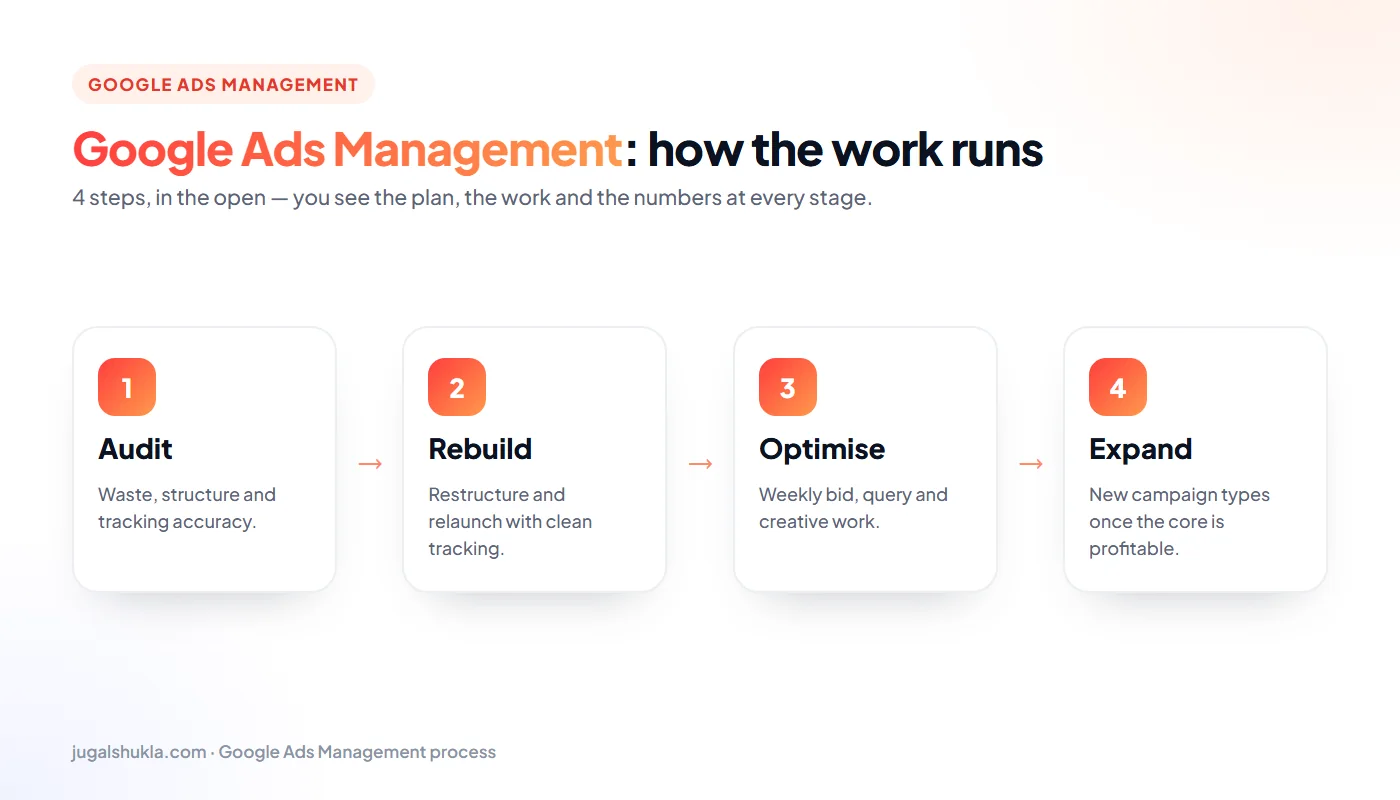
Google Ads process: Audit → Rebuild → Optimise → Expand
How a Google Ads Management engagement runs, step by step.
  1. Audit. For existing accounts: search terms, wasted spend, structure, ad strength, tracking accuracy and landing pages. For new accounts: competitor ads, keyword demand and realistic cost-per-click ranges.
  2. Rebuild. A clean structure, tight keyword themes, a strong negative list, new ads and assets, and conversion tracking verified end to end.
  3. Optimise. Weekly search-term mining, bid and budget shifts towards what converts, ad tests and landing-page improvements.
  4. Expand. Once cost per lead is stable: new locations, new services, remarketing, YouTube or Performance Max where they make sense.

The order matters. Expanding an account before tracking and structure are right multiplies waste; doing it after multiplies results.

What Google Ads costs in India

There are two costs: the ad spend you pay Google and the management fee you pay for expertise.

Ad spend

Cost per click varies hugely by industry and city. Local services often pay ₹10–₹60 per click; competitive B2B, legal, finance and education terms can cost ₹80–₹300 or more. A sensible starting budget for most small businesses is ₹15,000–₹30,000 a month — enough to gather data and find the searches that convert.

Management

My Google Ads Lead Plan starts at ₹4,999* a month for management and includes an account and competitor audit, campaigns, keywords and ad copy, call, form and WhatsApp tracking, weekly bid and negative-keyword work, and a monthly cost-per-lead report. Ad spend is paid directly to Google from your own account, which you always own.

Be wary of anyone who takes a percentage of spend with no performance accountability, or who runs ads from an account you cannot access. You should own the account, the data and the history.

Timelines and the results to expect
  • Week 1: campaigns go live with tracking verified; leads can start within days.
  • Weeks 2–6: the learning phase. Search terms are mined daily, negatives added and weak keywords paused. Cost per lead is usually volatile here.
  • Months 2–3: with enough conversions, smart bidding stabilises and cost per lead typically falls.
  • Month 4 onwards: steady optimisation and controlled expansion into new services or locations.

The most important result is predictability: knowing that ₹X of ad spend reliably produces Y qualified enquiries. Once you have that, scaling is a business decision rather than a gamble.

Your first 90 days with Google Ads

Month 1 — foundations and launch

Audit, tracking set up and tested, account rebuilt or built, landing pages improved and campaigns launched with conservative bids. You receive a launch summary listing every campaign and why it exists.

Month 2 — cut waste, find winners

Daily search-term review, a growing negative list, ad tests and budget moved towards the keywords and locations producing qualified leads. Lead quality is reviewed with you, not just lead count.

Month 3 — stabilise and plan growth

Smart bidding introduced where data allows, remarketing added, and a growth plan for the next quarter based on what the numbers show.

Google Ads mistakes that waste budget
  • Broad match without negatives: paying for searches that have nothing to do with your business.
  • Counting the wrong conversions: page views or button clicks as "leads", which teaches smart bidding the wrong lesson.
  • Sending all traffic to the homepage instead of a page that matches the search.
  • Auto-applied recommendations accepted without review.
  • Ignoring lead quality: optimising for cheap form fills that never become customers.
  • Display Network enabled on search campaigns by default.
  • No call tracking for businesses where most customers phone.
  • Changing too much, too often, so the bidding algorithm never stabilises.
Questions to ask before you hire a Google Ads expert
  • Will I own the Google Ads account? The only acceptable answer is yes.
  • How will you track leads, including calls and WhatsApp?
  • How often will you review search terms? Weekly at minimum during the first months.
  • How do you judge lead quality? Ask how sales feedback is used.
  • What does your monthly report contain? Cost per qualified lead should be front and centre.
  • Who does the work day to day? With me, you speak to the PPC consultant who manages the account.
  • What is the notice period? Short commitments keep everyone honest.
How Google Ads works with SEO and your other channels

Google Ads and SEO answer the same searches, so they should be planned together:

  • Keyword intelligence: ads reveal within weeks which searches convert; SEO then targets those terms for the long run.
  • Coverage: ads cover competitive terms while organic rankings build, then shift budget as SEO takes over.
  • Remarketing: visitors from SEO and social can be reached again with ads.
  • Landing pages: the same conversion improvements lift both paid and organic leads.
  • Meta Ads: Google captures existing demand; Meta creates new demand among people who are not searching yet.

Managed together, Google Ads stops being an expense that disappears when you pause it and becomes part of a growth system.

Choosing the right Google Ads campaign types

Google Ads is not one product. Choosing the right campaign types for your goal is one of the biggest decisions in Google Ads management, and the wrong choice wastes budget no matter how well it is optimised.

  • Search campaigns: text ads on Google results for the keywords you choose. The foundation for almost every lead-generation business, because the searcher has already told you what they want.
  • Performance Max: one campaign that runs across Search, Shopping, YouTube, Display, Discover, Gmail and Maps, guided by your conversion data. Excellent for e-commerce with a good product feed; risky for lead generation unless tracking is accurate, because it optimises towards whatever you call a conversion.
  • Shopping: product ads with image and price for online stores, powered by a Merchant Center feed.
  • Demand Gen and YouTube: visual ads that create demand among people who are not searching yet — useful for launches and remarketing.
  • Display: banner ads across websites and apps. Mostly useful for remarketing; poor for cold lead generation.
  • Local and call-focused setups: for businesses where the phone call is the conversion.

Most of my Google Ads clients start with tightly structured Search campaigns plus remarketing. Performance Max, Shopping and YouTube are added once the account has reliable conversion data — the order in which a Google Ads expert can scale without losing control of cost per lead.

Smart bidding explained in plain English

Smart bidding lets Google set each bid automatically, auction by auction, using signals like device, location, time and the searcher's history. Used well, it outperforms manual bidding. Used too early, it spends money confidently in the wrong direction.

The main strategies

  • Maximise clicks: useful only for a short data-gathering phase.
  • Maximise conversions: gets as many conversions as possible within your budget — good once tracking is clean.
  • Target CPA: aims for an average cost per lead you set.
  • Maximise conversion value / Target ROAS: for e-commerce and businesses that pass revenue or lead value back to Google.

When to trust it

Smart bidding is only as good as the conversions it learns from. If page views, button clicks or spam form fills are counted as conversions, the algorithm will happily find more of them. That is why every Google Ads management engagement starts with tracking: real calls, genuine forms and WhatsApp chats — and, ideally, offline conversion imports from your CRM marking which leads became customers. With that signal, Target CPA or Target ROAS consistently beats manual bidding.

Landing pages that convert Google Ads clicks

You pay for every click, so the page a visitor lands on decides whether that money turns into an enquiry. Many accounts I audit have reasonable ads sending traffic to a homepage that answers none of the searcher's questions.

A landing page built for Google Ads should:

  • Match the search: the headline repeats what the person searched for, in plain words.
  • Load in under three seconds on a phone: every second of delay loses visitors and raises your cost per lead through lower Quality Score.
  • Show proof immediately: reviews, certifications, client logos or numbers above the fold.
  • Offer one clear action: call, WhatsApp or a short form — not a menu of twenty links.
  • Ask for less: name and phone usually convert better than a ten-field form.
  • Answer objections: pricing guidance, timelines and FAQs reduce hesitation.

Improving a landing page from a 3% to a 6% conversion rate halves your cost per lead without changing the ads at all. That is why a PPC consultant who ignores landing pages leaves most of the improvement on the table.

How to measure Google Ads performance
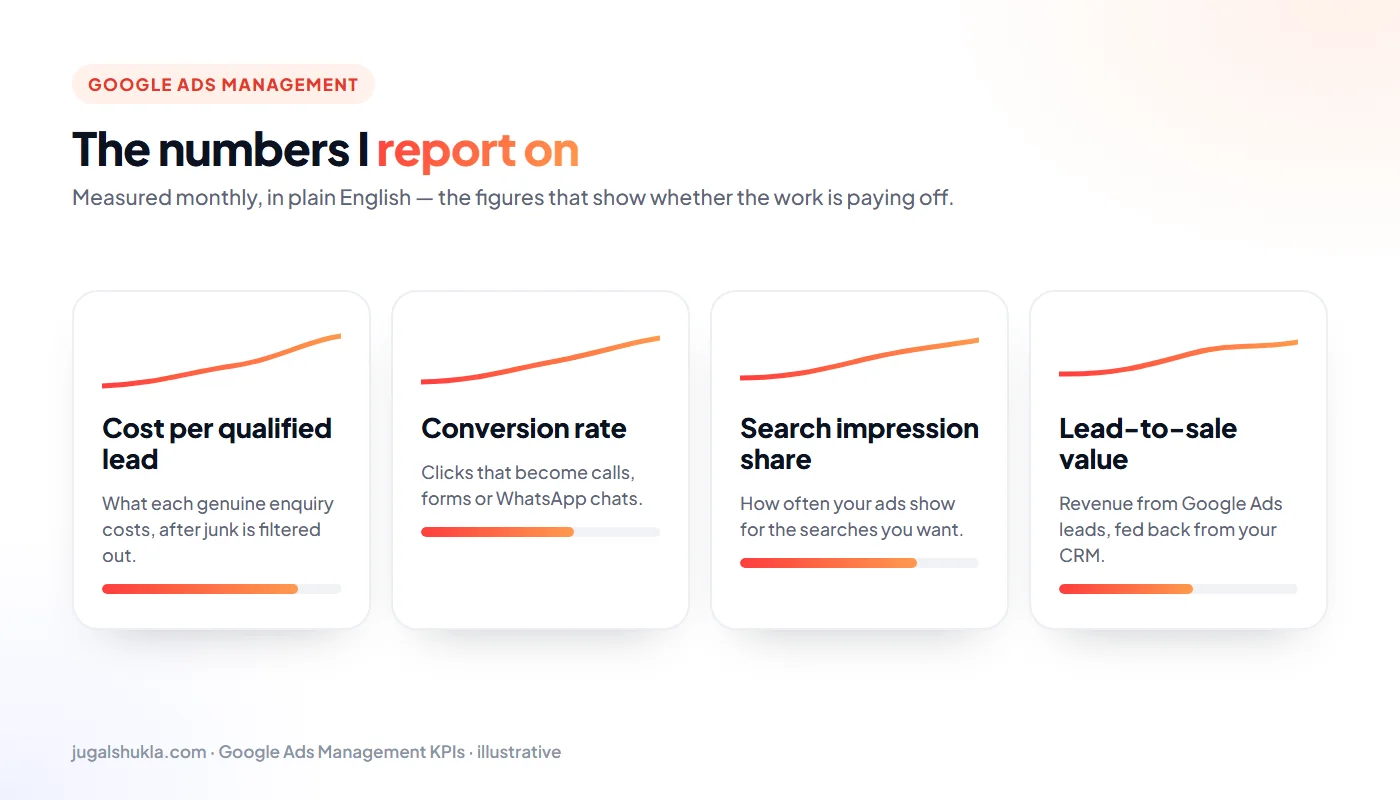
Google Ads KPIs: Cost per qualified lead, Conversion rate, Search impression share, Lead-to-sale value
The numbers I report on every month (illustrative).

Every monthly report leads with four numbers:

  • Cost per qualified lead: spend divided by genuine enquiries, after spam and irrelevant leads are removed.
  • Conversion rate: the share of clicks that become calls, forms or WhatsApp chats.
  • Search impression share: how often you appear for the searches you target — and why you miss the rest.
  • Lead-to-sale value: revenue from Google Ads leads, using your CRM or sales feedback.

Self-check: open your search terms report for the last 30 days. If more than a fifth of spend went on searches you would never want, Google Ads management can usually cut cost per lead quickly.

FAQ

Google Ads questions, answered.

11 straight answers to what people ask me most about Google Ads Management. Still unsure? Send a quick message — I reply within 24 hours.

Still have a question?

Ask me directly — no bots, no sales team.

Do you charge a percentage of spend?

No. Flat retainer, so my advice stays independent of your budget.

Will you run Performance Max?

Yes, with tight signals and exclusions rather than blind trust.

Can you rescue a suspended account?

I can help with policy remediation and appeals.

How much should I spend on Google Ads per month?

For most small businesses, ₹15,000–₹30,000 a month is a sensible starting point to gather data. Competitive B2B or national campaigns need more. Management starts at ₹4,999* a month on top of ad spend.

Who owns the Google Ads account?

You do, always. I work inside your account as a manager, so the data and history stay with you.

How soon will I get leads from Google Ads?

Often within the first week. Cost per lead usually stabilises after six to ten weeks of optimisation.

Do you also manage Performance Max and Shopping campaigns?

Yes, when they suit the business — especially for e-commerce. They are added once tracking and product feeds are in good shape.

Can you fix an account another agency set up?

Yes. I start with an audit, keep what works and rebuild what wastes money — usually without pausing your leads.

How do you track phone calls from ads?

With call assets, Google forwarding numbers where appropriate and click-to-call tracking on your website through Tag Manager.

Why are my clicks so expensive?

Common causes are broad keywords, low ad relevance, slow landing pages and strong competition. An audit shows which apply to you.

Is Google Ads better than SEO?

They do different jobs. Ads bring leads immediately; SEO builds leads you do not pay per click for. Most growing businesses benefit from both.

Next step

Want a hands-on partner, not a deck?

Tell me what you’re trying to grow. I’ll tell you honestly whether I’m the right person, and what I’d do first.

Send a quick brief

I reply within 24 hours.